Showing posts with label editing. Show all posts

Saturday, 19 January 2013

Editing


Our group wanted to have a blinking effect on the second shot, this would recreate a POV from the killer, and we feel that having a blinking effect will emphasise this.

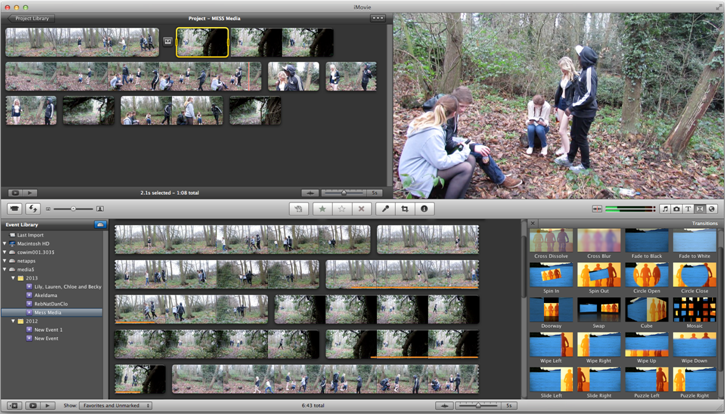
1. Firstly, I added a transition of "wipe down" to try and recreate the blinking effect, this lead to a wipe down of the screen from the first shot to the second one. 
2. I then had to split the clip, in order to add more transitions to the shot, because the killer will have to blink more than once. 
3. I then altered the duration of the transition as the transition was previously too slow, I felt that 0.2s was much more effective than a shorter duration of time.
4. After splitting the clip, I continued on to adding more transitions in between the clips, I still used the "wipe down" transition.
5. After this, I had to repeat the same step as "3" in order to make the transition an appropriate amount of time to look authentic. 
6. Finally, I added more transitions in between after I continued to split the clip more. Also repeating step 3 for this process.

Overall, the clip did transition in between the splitted clips, however it did not look as effective as once hoped. When editing this in the future, we should add a black shot to portray the eyes closing. 

Sunday, 13 January 2013

Changing the Brightness/Contrast on iMovie

One of the potential problems faced with our filming was the lighting as we were shooting outdoors at a time of year where daylight was scarce, in order to ensure that we had a way around this I checked how I could change the brightness of a clip on iMovie.

Here is a picture I found on the internet of a dark forest, I played around with the lighting of the clip to see how it would look.


If the light was too bright and we needed to darken it, by changing the brightness and contrast to a darker setting this could have been achieved, heres the result.


As you can see, the shot is now darker, if this was needed I could create a dark scene simply by adjusting a few things, now I am going to make it brighter.

Now it is brightened you can see the forest more clearly and the source of light which is the moon stands out much more, in doing so you can make a dark shot bright which makes it easier to see all the features which are within the picture.

I now know that I can easily alter a video using iMovie if needed.


Friday, 16 November 2012

Enter the Void


  • The use of Point of View shot made extremely more realistic with the illusion of blinking editing in, makes it realistic to the audience as though they are literally seeing through the characters eyes not just from his point of view. Even when the character puts his hands over his face, the editing makes the audience see the hands come over his face.

  • The shot isn't very clear, the room looks blurry and at some points as though it is spinning which helps the audience to understand how the character is feeling and again see exactly what the character is seeing

  • Canted angles are used, they make the shot appear as though it's tilted which happens a lot throughout this shot. They help to indicate the movement of the characters head and maked the shot more realistic.

  • With the room spinning and being able to hear his thoughts, we gain the understanding that nothing is right in the view of the character.
  • Diegetic sound is unclear, their his thoughts, maybe suggesting the drugs have made his thoughts unclear as well as his vision.


  • In this shot, it appears as though that the image is being repeated, like there's two of everything that the character is seeing. It helps the viewer to see exactly what the character is seeing and how he is seeing it.